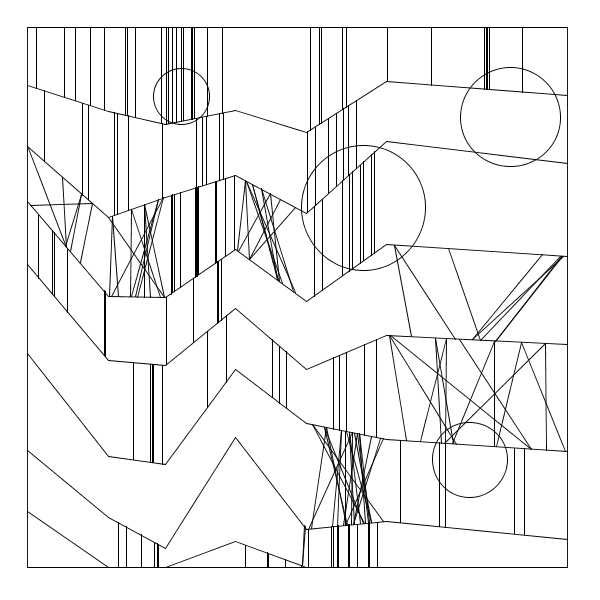
EvanSheehan-13-9-65

by Evan @ 11:29 pm 22 January 2012


Also available here.

1
2
3
4
5
6
7
8
9
10
11
12
13
14
15
16
17
18
19
20
21
22
23
24
25
26
27
28
29
30
31
32
33
34
35
36
37
38
39
40
41
42
43
44
45
46
47
48
49
50
51
52
53
54
55
56
57
58
59
60
61
62
63
64
65
66
67
68
69
70
71
72
73
74
75
76
77
78
79
80
81
82
83
84
85
86
87
88
89
90
91
92
93
94
95
96
97
98
99
100
101
102
103
104
105
106
107
108
109
110
111
112
113
114
PVector[][] vertices;
 
void setup() {
  size(600, 600);
  background(255);
  smooth();
 
  vertices = new PVector[int(random(5, 10)) + 1][int(random(6, 10)) + 1];
 
  for (int i = 0; i < vertices.length; i++) {
    PVector row[] = vertices[i];
 
    for (int j = 0; j < row.length; j++) {
      int x = 0, y = 0;
 
      if (i > 0) {
        x = int(vertices[0][j].x);
      } else if (j > 0) {
        x = int(row[j - 1].x + random(width / 10, width / 6));
        if (x > width || j >= row.length - 1) {
          x = width;
        }
      }
 
      if (i > 0) {
        do {
          float dy = random(height / 10, height / 5);
          y = int(vertices[i - 1][j].y + dy);
        } while (y < vertices[i - 1][j].y);
 
        if (y > height) {
          y = height;
        }
      }
 
      row[j] = new PVector(x, y);
    }
  }
 
  noFill(); 
  noLoop();
}
 
void draw() {
  // Set up margins and border
  scale(0.9);
  translate(.05 * width, .05 * height);
  rect(0, 0, width, height);
 
  for (int i = 0; i < vertices.length; i++) {
    PVector row[] = vertices[i];
    PVector last = row[0];
 
    for (int j = 1; j < row.length; j++) {
      PVector v = row[j];
 
      if (i+1 < vertices.length) {
        float p = random(1.0);
        if (p < 0.4) {
          verticalLines(last, v, vertices[i+1][j-1], vertices[i+1][j]);
        } else if (p < 0.65) {
          drawTriangles(last, v, vertices[i+1][j-1], vertices[i+1][j]);
        }
      }
 
      line(last.x, last.y, v.x, v.y);
      last = v;
    }
  }
 
  for (int i = 0; i < random(1, 6); i++) {
    int r = int(random(10, height / 4));
    ellipse(int(random(r / 2, width - r / 2)), int(random(r / 2, height - r / 2)), r, r);
  }
 
  save("plotter.tif");
}
 
void verticalLines(PVector tl, PVector tr, PVector bl, PVector br) {
  float top_slope = (tr.y - tl.y) / (tr.x - tl.x);
  float bottom_slope = (br.y - bl.y) / (br.x - bl.x);
  float top_b = tl.y - top_slope * tl.x;
  float bottom_b = bl.y - bottom_slope * bl.x;
 
  for (int i = 0; i < random(30); i++) {
    int x = int(random(tl.x, tr.x));
    line(x, top_slope * x + top_b, x, bottom_slope * x + bottom_b);
  }
}
 
void drawTriangles(PVector tl, PVector tr, PVector bl, PVector br) {
  float top_slope = (tr.y - tl.y) / (tr.x - tl.x);
  float bottom_slope = (br.y - bl.y) / (br.x - bl.x);
  float top_b = tl.y - top_slope * tl.x;
  float bottom_b = bl.y - bottom_slope * bl.x;
 
  for (int i = 0; i < random(30); i++) {
    int x = int(random(tl.x, tr.x));
    int x2 = int(random(tl.x, tr.x));
    int x3 = int(random(tl.x, tr.x));
 
    while (x3 == x2) {
      x3 = int(random(tl.x, tr.x));
    }
 
    if (random(1.0) < 0.3) {
      line(x2, top_slope * x2 + top_b, x, bottom_slope * x + bottom_b);
      line(x3, top_slope * x3 + top_b, x, bottom_slope * x + bottom_b);
    } else {
      line(x, top_slope * x + top_b, x2, bottom_slope * x2 + bottom_b);
      line(x, top_slope * x + top_b, x3, bottom_slope * x3 + bottom_b);
    }
  }
}

Zack J-W Look Out! – 1

by zack @ 11:15 pm

The new roller coaster is here!  And it’s fake.  But my recon (1 dude) has confirmed that it’s a pretty good fake.  Awesome actually.

The Wizarding World of Harry Potter is a ride  that simulates a Nimbus 2000 broom flight with H.P. via something akin to Lexus’s virtual driving simulators.  It’s using high end robotic platforms combined with audio/visual to create a race around Hogwarts that feels pretty real.

[youtube https://www.youtube.com/watch?v=iT7CPDrK8ro]

The cool thing about it according to eternal kid James Krahe is that the experience is stellar.  He said, “I couldn’t figure out how they were doing it”.

They were doing it with an overgrown robotic arm that functions just like CMU’s dFab arms.  It has full range of motion relative to a fixed point at the base which is more than enough to simulate the G’s involved in whipping around a roller coaster and indeed forces that would rip a car on a track to pieces if it tried to change direction as fast.  The cool thing is, we can have different experiences.  The question is, are they as cool as being 400 ft of the ground in a tiny train car looking out over the world.  We’ll see…


EliRosen – 13-9-65

by eli @ 10:27 am


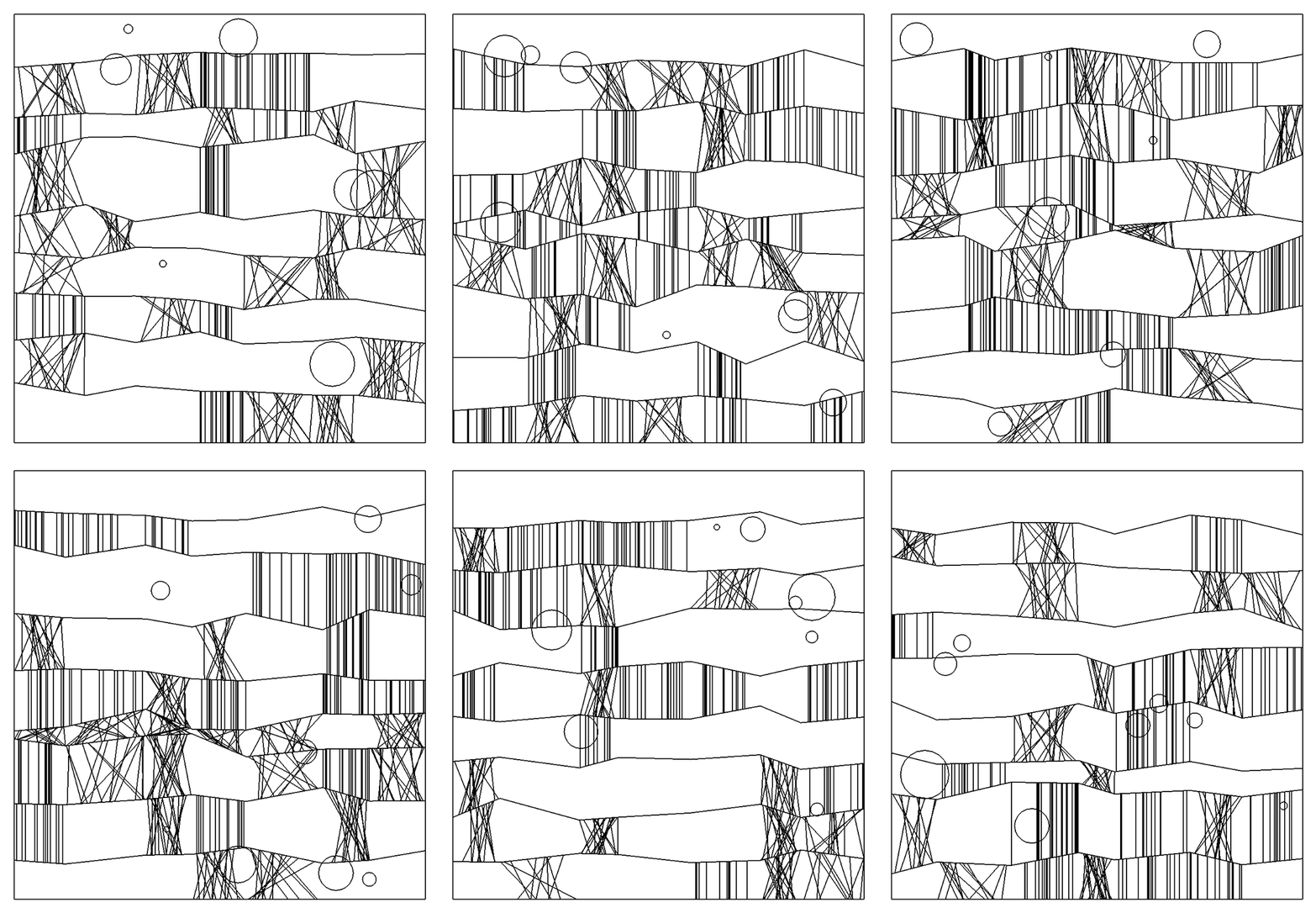
/**
 * Program to recreate 13/9/65 by Frieder Nake
 * Creates a random drawing similar to Nake's drawing
 */
 
int drawWidth = 600;
int drawHeight = 600;
 
float numCircles = random(6,10);
 
int numLines = 11;
int numVertices = 8;
 
// Create arrays to hold x, y coords
// holds x coords of the vertices
float[]x = new float[numVertices];
/* holds y coordinates of the vertices, where the first index refers to the vertical grid line it falls on (counted left to right)
 * and the second index refers to the zigzag line it belongs to (counted top to bottom)
 */
float[][]y = new float[numVertices][numLines];
 
boolean[][]filled = new boolean[numVertices][numLines];
 
void setup()
{
  size(drawWidth, drawHeight);
  background(255);
  smooth();
  noFill();
  stroke(0);
 
  // sets minimum horizontal segment width
  int minSegmentWidth = 45;
  //set x position of vertices
  x[0]=0;
  for(int i =1; i&lt;numVertices-1; i++)
  {
    // creates random horizontal segment widths (vertical grid lines)
    x[i] = ((drawWidth/(numVertices-1))*i) + random((((drawWidth/(numVertices-1))-minSegmentWidth)*-1), ((drawWidth/(numVertices-1))-minSegmentWidth));
  }
  x[numVertices-1]=drawWidth-1;
 
  // bounds for random vertical offset from initial y value in zigzag line
  int vertBound = 45;
  //set y position of vertices
  //loop through all zigzag lines
  for(int iy = 0; iy &lt; numLines; iy++)
  {
    // loop through all vertical grid lines
    for(int ix = 0; ix &lt; numVertices; ix++)
    {
      if(iy==0)
      {
        y[ix][iy] = 0;
      }
      else if(iy==numLines-1)
      {
        y[ix][iy] = drawHeight;
      }
      else
      {
        y[ix][iy] = ((drawHeight/(numLines-1))*iy) + random((((drawHeight/(numLines-1))-vertBound)*-1), (drawHeight/(numLines-1))-vertBound);
      }
    }
  }
}
 
void draw()
{
  background(255);
  //Draw top line
  line(0,0,drawWidth,0);
  line(0,1,drawWidth,1);
  //draw bottom line
  line(0,drawHeight,drawWidth,drawHeight);
  line(0,drawHeight-1,drawWidth,drawHeight-1);
  line(0,drawHeight-2,drawWidth,drawHeight-2);
  //draw left line
  line(0,0,0,drawHeight);
  line(1,0,1,drawHeight);
  //draw right line
  line(drawWidth,0,drawWidth,drawHeight);
  line(drawWidth-1,0,drawWidth-1,drawHeight);
  line(drawWidth-2,0,drawWidth-2,drawHeight);
 
  // Draw all the zigzag lines
  //loop through all horizontal grid lines
  for(int iy = 1; iy &lt; numLines; iy++)
  {
    // loop through all vertical grid lines
    for(int ix = 1; ix &lt; numVertices; ix++)
    {
      //draw all the zig zag lines
      line(x[ix-1],y[ix-1][iy], x[ix],y[ix][iy]);
    }
  }
 
 
  //loop through all horizontal grid lines
  for(int iy = 1; iy &lt; numLines; iy++)
  {
    // loop through all vertical grid lines
    for(int ix = 1; ix &lt; numVertices; ix++)
    {
      //Draw the quadrilateral fills (this determines chance of getting any particular fill)
      int fillPick = int(random(0,12));
      // if fillPick is 0 do nothing
      // if fillPick is 1 then draw triangles
      if((fillPick &lt; 3) &amp;&amp; filled[ix][iy]==false)
      {
        // whether to put the point of the triangle on the to or bottom of the quadrilateral
        int dirPick = int(random(1,3));
 
        // declare slope and intercept variables for bottom and top of quadrilateral
        float slope1=0;
        float intercept1=0;
        float slope2=0;
        float intercept2=0;
 
        // if dirPick is 1 then put the point of the triangle at the top
        if(dirPick==1)
        {
          // the slope of the top bound of the current quadrilateral
          slope1 = (y[ix-1][iy-1]- y[ix][iy-1])/(x[ix-1]-x[ix]);
          // the y intercept of the top bound
          intercept1 = y[ix-1][iy-1] - (slope1*x[ix-1]);
 
          // the slope of the bottom bound of the current quadrilateral
          slope2 = (y[ix-1][iy]- y[ix][iy])/(x[ix-1]-x[ix]);
          // the y intercept of the bottom bound of the current quadrilateral
          intercept2 = y[ix-1][iy] - (slope2*x[ix-1]);  
        }
        // otherwise put the point at the bottom
        else
        {
          // the slope of the top bound of the current quadrilateral
          slope2 = (y[ix-1][iy-1]- y[ix][iy-1])/(x[ix-1]-x[ix]);
          // the y intercept of the top bound
          intercept2 = y[ix-1][iy-1] - (slope2*x[ix-1]);
 
          // the slope of the bottom bound of the current quadrilateral
          slope1 = (y[ix-1][iy]- y[ix][iy])/(x[ix-1]-x[ix]);
          // the y intercept of the bottom bound of the current quadrilateral
          intercept1 = y[ix-1][iy] - (slope1*x[ix-1]); 
        }
        // the number of triangles to draw
        float numTriangles = random(5, 10);
        // loop through the number of triangles
        for(int i=0; i 2 &amp;&amp; fillPick &lt; 6) &amp;&amp; filled[ix][iy]==false)
      {
        // the slope of the top bound of the current quadrilateral
        float slope1 = (y[ix-1][iy-1]- y[ix][iy-1])/(x[ix-1]-x[ix]);
        // the y intercept of the top bound
        float intercept1 = y[ix-1][iy-1] - (slope1*x[ix-1]);
 
        // the slope of the bottom bound of the current quadrilateral
        float slope2 = (y[ix-1][iy]- y[ix][iy])/(x[ix-1]-x[ix]);
        // the y intercept of the bottom bound of the current quadrilateral
        float intercept2 = y[ix-1][iy] - (slope2*x[ix-1]);
 
       // the number of lines to draw
        float numLines = random(5, 15);
        // loop through the number of lines
        for(int i=0; i&lt;numLines; i++)
        {
          // get a random x in the current quadrilateral
          float randomX1 = random(x[ix-1],x[ix]);
          // get a random y based on the random x (so that it falls on one of the quadrilateral bounding lines)
          float randomY1 = (slope1*randomX1)+intercept1;
          // get a random y based on the random x (so that it falls on one of the quadrilateral bounding lines)
          float randomY2 = (slope2*randomX1)+intercept2;
          // draw a lines to from the top to the bottom bounding lines
          line(randomX1, randomY1, randomX1, randomY2);
        } 
      }
      // if fillPick is 3 then draw straight lines down an extra row
      else if(fillPick == 6 &amp;&amp; iy &lt; numLines-1 &amp;&amp; filled[ix][iy]==false)
      {
        // the slope of the top bound of the current quadrilateral
        float slope1 = (y[ix-1][iy-1]- y[ix][iy-1])/(x[ix-1]-x[ix]);
        // the y intercept of the top bound
        float intercept1 = y[ix-1][iy-1] - (slope1*x[ix-1]);
 
        // the slope of the bottom bound of the current quadrilateral
        float slope2 = (y[ix-1][iy+1]- y[ix][iy+1])/(x[ix-1]-x[ix]);
        // the y intercept of the bottom bound of the current quadrilateral
        float intercept2 = y[ix-1][iy+1] - (slope2*x[ix-1]);
 
        // the number of lines to draw
        float numLines = random(5, 15);
        // loop through the number of lines
        for(int i=0; i&lt;numLines; i++)
        {
          // get a random x in the current quadrilateral
          float randomX1 = random(x[ix-1],x[ix]);
          // get a random y based on the random x (so that it falls on one of the quadrilateral bounding lines)
          float randomY1 = (slope1*randomX1)+intercept1;
          // get a random y based on the random x (so that it falls on one of the quadrilateral bounding lines)
          float randomY2 = (slope2*randomX1)+intercept2;
          // draw a lines to from the top to the bottom bounding lines
          line(randomX1, randomY1, randomX1, randomY2);
        }
        // set the lower quadrilateral to filled
        filled[ix][iy+1] = true; 
      }
    }
  }
 
 
  // Draw the circles
  for (int i = 0; i &lt; numCircles; i++)
  {
    // get a circle with a random circumference
    float circum = random(4, 100);
    // get the circle&#039;s radius
    float circRad = circum/2;
    // get the minimum x and y postion that would keep the circle in frame
    float minPos = 0+circRad;
    // get the maximum x and y position that would keep the circle in frame
    float maxPos = drawHeight-circRad;
    // draw the random circle
    ellipse(random(minPos, maxPos), random(minPos, maxPos), circum, circum);
  }
  delay(2500);
}

Nick Inzucchi – 13-9-65

by nick @ 8:02 pm 21 January 2012


#include "testApp.h"
 
int gap = 30;	// Ev!l globals
int noise = 4;
int nLines = 8;
int nPoints = 8;
int nCircles = 8;
 
//--------------------------------------------------------------
void testApp::setup(){
	ofBackground(255,255,255);
 
	ofNoFill();			// Setup Drawing
	ofSetColor(0,0,0);
	ofSetLineWidth(2);
}
 
//--------------------------------------------------------------
void testApp::draw(){
	drawLines();			// Draw each component
	drawStripes();
	drawCircles();
 
	ofSaveScreen(ofToString(ofGetFrameNum()));
	ofSleepMillis(2000);		// Save screen / rest
}
 
void testApp::drawLines(){	
	int w = ofGetWidth() - 2 * gap;		// Frame size
	int h = ofGetHeight() - 2 * gap;
 
	int hSpace = w / ( nPoints - 1 );	// Dist between lines / vertices
	int vSpace = h / ( nLines + 1 );
 
	for( int i = 0; i &lt; nLines; i++ ){	// Calc vertical divisions
		vertGrid[i] = vSpace * i + gap + vSpace + ofRandom( -vSpace / noise, vSpace / noise );
	}
	for( int i = 0; i &lt; nPoints; i++ ){	// Calc horizontal divisions
		horizGrid[i] = hSpace * i + gap + ofRandom( -hSpace / noise, hSpace / noise );
	}
	horizGrid[0] = gap;			// Move L/R vertices to edges
	horizGrid[nPoints - 1] = w + gap;
 
	for( int i = 0; i &lt; nLines; i++ ){	// Create vertex array for drawing
		for( int j = 0; j &lt; nPoints; j++ ){		
			lines[i][j].x = horizGrid[j];
			lines[i][j].y = vertGrid[i] + ofRandom( -vSpace / noise, vSpace / noise );
		}
	}
 
	for( int i = 0; i &lt; nLines; i++ ){	// Draw lines
		ofBeginShape();
		for( int j = 0; j &lt; nPoints; j++ ){
			ofVertex( lines[i][j].x, lines[i][j].y );
		}
		ofEndShape();
	}
 
	ofRect(gap, gap, ofGetWidth() - 2 * gap, ofGetHeight() - 2 * gap );	// Draw Frame
}
 
void testApp::drawStripes(){
	for( int i = 0; i &lt; nLines; i++ ){
		for( int j = 0; j &lt; nPoints - 1; j++ ){
			int type = ofRandom(0,2);		// Flip a coin
 
			if (type){				// Draw stripes if true
				int stripes = ofRandom(10,20);
				int crossed = ofRandom(0,2);	// Flip a coin straight/crossed
 
				ofVec2f leftUp = lines[i][j];	// Each block of stripes depends on 4 vertices
				ofVec2f rightUp = lines[i][j+1];
				ofVec2f leftDown = lines[i+1][j];
				ofVec2f rightDown = lines[i+1][j+1];
 
				for( int k = 0; k &lt; stripes; k++ ){
					ofVec2f lineStart;	// Draw a block of stripes
					ofVec2f lineEnd;
 
					lineStart.x = ofRandom( leftUp.x, rightUp.x );						
					lineEnd.x = (crossed) ? ofRandom( leftUp.x, rightUp.x ) : lineStart.x;
 
					float slopeUp = (rightUp.y - leftUp.y) / (rightUp.x - leftUp.x);
					float slopeDown = (rightDown.y - leftDown.y) / (rightDown.x - leftDown.x);
 
					lineStart.y = leftUp.y + ( ( lineStart.x - leftUp.x ) * slopeUp );
					lineEnd.y = leftDown.y + ( ( lineEnd.x - leftUp.x ) * slopeDown );
 
					if (i == nLines - 1){	// Account for final line
						lineEnd.y = ofGetHeight() - gap;
					}
					ofLine(lineStart.x, lineStart.y, lineEnd.x, lineEnd.y);
				}
			}
		}
	}
}
 
void testApp::drawCircles(){
	for( int i = 0; i &lt; nCircles; i++ ){	   	// Draw circles
		float r = ofRandom( 5, 50 );		// Randomize size
		ofCircle( ofRandom( gap + r, ofGetWidth() - gap - r ), ofRandom( gap + r, ofGetHeight() - gap - r), r);
	}
}

EliRosen – LookingOutwards1

by eli @ 5:07 pm

[youtube https://www.youtube.com/watch?v=gusJeslMbLc]

This is a water clock in Osaka.  The falling droplets of water form images. I think this is mostly successful for me because of the novelty.  The visuals and sounds that are generated are very fun.  I would love to see some other programs written for this visualization tool, as the ones here are a little but hokey.  I also feel that the installation begs to be played with.  I want to touch the letters and images as they fall.  Perhaps there is an opportunity to create interactive experiences with this kind of water printer where touching or breaking up the images would affect the output.  Make a game out of it.

[youtube https://www.youtube.com/watch?v=qRD4ladUSOc]

I love motion design and it has only recently come to my attention that high end motion often requires the development of custom apps and algorithms.  One of the code artists who worked on this spot also worked extensively on algorithmic animations for the Tron legacy film.  You can see a lot of similarities in the kinds of effects he is creating.  Pretty cool stuff. Here is his website.

[youtube https://www.youtube.com/watch?v=oLnKSKaY1Yw]

I was able to check out the interactive art exhibition Talk to Me at the MoMA in NYC in the fall and this was on of the more fun and playful projects there.  It is an installation that allows a user to sling an SMS onto a projection.  I think it basically consists of a cellphone hidden inside a slingshot.  You can input a message into the slingshot and when the slingshot detects that it has been fired an animation is triggered that makes it appear that the message has been launched onto the projected surface.

MadelineGannon-LookingOutwards-1

by madeline @ 1:56 pm

Thoughts by Marius Watz on the future of the screen saver, now that its utilitarian purpose is obsolete. Watz illustrates the importance of early screen savers in promoting generative techniques in digital art and design, and presents new perspectives for advancing Screen Saver Culture in the 21st century:

[scribd id=78375321 key=key-1hj0l32t50lshdkbkjzd mode=slideshow]

______________________________________________________________________________________

Thoughts by Koert van Mensvoort on Next Nature, when the Born and Made become one:

[youtube https://www.youtube.com/watch?v=BDbasRTyzmE&w=560&h=315]

Nir Rachmel | 01-20-2012

by nir @ 10:34 pm 20 January 2012

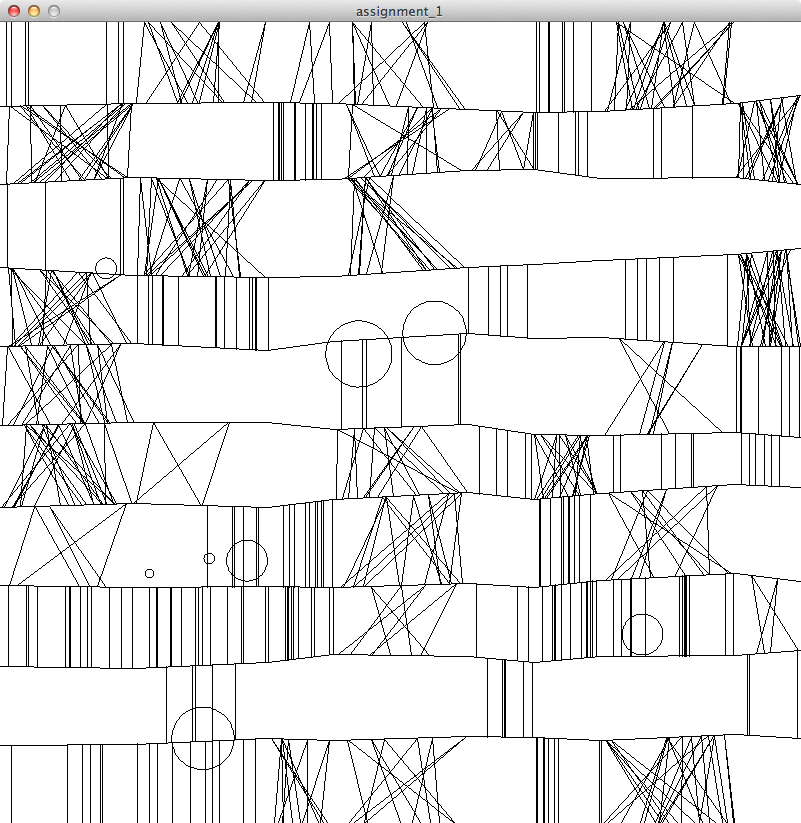
Following is an image created by an algorithm inspired by Nake’s work from 1965.

 
Following is the code that generates an image following the same concepts as Nake's pioneering work in <a title="digital art" href="http://dam.org/artists/phase-one/frieder-nake" target="_blank">digital art</a> using a plotter.
 
NakeDraw myNake;
 
void setup() {
  size(801,801);
  background(255);
  stroke(0);
  myNake = new NakeDraw();
}
 
int drawOnce = 0;
 
void draw() {
  if (drawOnce == 0)
  {
    myNake.draw();
    drawOnce = 1;
  }
}
 
/**
* Class NakeDraw - Implements an algorithm to create an image inspired by Frieder Nake's work publshed 1956-57
* called Nr. 2 ("Klee").
* The image is composed of several repeated and random elements
* 1. Horizontal lines that "break" in the middle and change direction. They never intersect each other.
* 2. These lines create quadrilaterals between them.
* 3. Each quadrilateral can either be empty, have a random set of vertical+parallel lines or have a set of triangles
*
* Nir Rachmel, Interactive art and computational design, Jan 2012 (C)
* A link that helped analyze the original image: http://dada.compart-bremen.de/node/2875.
*/
class NakeDraw {
  int numOfRows; // number of rows on the canvas
  int numOfColumns; // number of columns on the canvas
  PVector[][] verticesArr; // array that holds all the vertices that define the skeleton of the horizontal lines
  float[] horizontalSpaces; // array to hold the distance that defines a horizontal section
  float baseBandWidth; // basic width between two consequtive horizontal lines (subject to noise)
  float verticalNoise; // vertical noise limit
  float smallNoise; // 
 
  // C'tor
  NakeDraw() {
    numOfRows = 11; // including both upper and lower frame borders
    numOfColumns = 9;
    verticesArr = new PVector[numOfRows][numOfColumns];
    horizontalSpaces = new float[] {1/6f, 1/6f, 1/12f, 1/6f, 1/12f, 1/12f, 1/6f, 1/12f};
    // Basic space between two horizontal lines
    baseBandWidth = height / 10;
    verticalNoise = baseBandWidth * 0.05;
    smallNoise    = baseBandWidth / 8;    
 
    // Initialize arrray
    for (int i=0 ; i &lt; numOfRows ; i = i+1)
    {
      for (int j=0 ; j &lt; numOfColumns ; j = j+1)
      {
        verticesArr[i][j] = new PVector(0,0);
      }
    }
 
  }
 
  // performs the drawing of the image. Using random numbers, the decision is made
  // for each quadrilateral if to leave it blank, fill it with horizontal lines or vertical lines.
  void draw()
  {
    // Draw the horizontal rows
     drawRows();
 
     // go over each quadrilateral and randomly draw lines / triangles / nothing
     int numOfBands = numOfRows -1;
     for (int i=0 ; i &lt; numOfBands ; i=i+1)
    {
       for (int j=0 ; j &lt; numOfColumns-1 ; j=j+1)
      {
         int pattern = int(random(0,3));
         if (pattern == 0)
         {
            drawVerticalLinesPattern(i,j);
         }
         if (pattern == 1)
         {
            drawTriangles(i,j);
         }
      }
    }
 
    // Circles are drawn on the image without relation to the other shapes.
    drawCircles();
  }
 
  /**
  * Draw the horiztonal rows.
  */
  void drawRows()
  {    
 
   // initialize top and bottom row (which are straight lines, part of the frame)
   verticesArr[0][0].set(0f,0f,0f);
   verticesArr[numOfRows-1][0].set(0f,height,0f);
   for (int j=1 ; j &lt; numOfColumns ; j=j+1)
   {
      float xVal = verticesArr[0][j-1].x + horizontalSpaces[j-1] * width;
      verticesArr[0][j].set(xVal, 0f, 0f);
      verticesArr[numOfRows-1][j].set(xVal,height,0f);
   }
 
    // Set the initial vertices on the left border
    for (int i=1 ; i&lt;numOfRows-1 ; i=i+1)
    {
       float yVal = 0;
       yVal = verticesArr[i-1][0].y + baseBandWidth + random(-verticalNoise, verticalNoise);
       verticesArr[i][0].set(0f,yVal,0f);
    }
 
    // start from each randomly generated vertex and draw a random horizontal line that stretches
    // all the way to the right border of the window. This line is not straight, and randomly changes its direction.
    for (int i=1 ; i &lt; numOfRows-1 ; i = i+1) // rows
    {
      for (int j=1 ; j &lt; numOfColumns ; j = j+1) // columns (first is already set)
      {
         float xVal = verticesArr[i][j-1].x + horizontalSpaces[j-1] * width;
         float yVal = verticesArr[i][j-1].y + random(-smallNoise, smallNoise);
         verticesArr[i][j].set(xVal, yVal, 0f);
          line(verticesArr[i][j-1].x,verticesArr[i][j-1].y,
               xVal, yVal);
      }
    }
  }
 
  /**
  * A helper function that calculates the y coordinates according to a given x coordinate, row and column
  * (that uniquely identifies a straight line on the screen)
  */
  float calculateY(int rowNum, int colNum, float xCoordinate, boolean isTop)
  {
       float yCoordinate = 0;
 
       if (isTop)
       {
         if (rowNum == 0)
         {
           yCoordinate = 0;
         }
         else
         {
           // y coordinate needs to be calculated for both top line and bottom.
           float slopeTop = (verticesArr[rowNum][colNum+1].y - verticesArr[rowNum][colNum].y) /
                       (verticesArr[rowNum][colNum+1].x - verticesArr[rowNum][colNum].x );
 
           float constValTop =  verticesArr[rowNum][colNum].y - slopeTop * verticesArr[rowNum][colNum].x;
 
           // now we have the equation, we can find the top coordinates for the vertical line
           yCoordinate = slopeTop * xCoordinate + constValTop;
         }
       }
       if (!isTop)
       {
         if (rowNum == (numOfRows - 1))
         {
           yCoordinate = height;
         }
         else
         {
           float slopeBottom = (verticesArr[rowNum+1][colNum+1].y - verticesArr[rowNum+1][colNum].y) /
                       (verticesArr[rowNum+1][colNum+1].x - verticesArr[rowNum+1][colNum].x );
 
           float constValBottom =  verticesArr[rowNum+1][colNum].y - slopeBottom * verticesArr[rowNum+1][colNum].x;
 
           yCoordinate = slopeBottom * xCoordinate + constValBottom;
         }  
 
       }
 
       return yCoordinate;
 
  }
 
  /**
  * Draws the random group of vertical lines as constrained by a single quadrilateral.
  * Will draw up to 15 lines.
  */
  void drawVerticalLinesPattern(int rowNum, int colNum)
  {
    /* Draw vertical lines */
    int numOfLines = int(random(1, 15));
    for (int i=0 ; i &lt; numOfLines ; i=i+1)
    {
       // x coordinate is just a random x between the two adjacent vertices
       println("rowNum is " + rowNum + " colNum is " + colNum);
       float xCoordinate = random(verticesArr[rowNum][colNum].x, verticesArr[rowNum][colNum+1].x);
 
       float yCoordinateTop = calculateY(rowNum, colNum, xCoordinate, true);
       float yCoordinateBottom = calculateY(rowNum, colNum, xCoordinate, false);       
 
       line(xCoordinate, yCoordinateTop, xCoordinate, yCoordinateBottom);
 
    }
 
  }
 
  /**
  * Draws the random group of triangles as contrained by a single quadrilateral.
  * Will draw up to 15 triangles.
  **/
  void drawTriangles(int rowNum, int colNum)
  {
     int numOfTriangles = int(random(1,15));
     for (int k=0 ; k &lt; numOfTriangles ; k = k+1)
     {
        // randomly select 3 x's
       float x1 = random(verticesArr[rowNum][colNum].x, verticesArr[rowNum][colNum+1].x);
       float x2 = random(verticesArr[rowNum][colNum].x, verticesArr[rowNum][colNum+1].x);
       float x3 = random(verticesArr[rowNum][colNum].x, verticesArr[rowNum][colNum+1].x);
 
       // x1 will always be on the top line, x2+x3 will be on the bottom line
       float y1 = calculateY(rowNum, colNum, x1,true);
       float y2 = calculateY(rowNum, colNum, x2, false);
       float y3 = calculateY(rowNum, colNum, x3, false );  
 
       line(x1,y1,x2,y2);
       line(x1,y1,x3,y3);
     }
 
  }
 
  /**
  * Draws random circles on the screen (up to 10). Radius and locations are random.
  * Locations are calculated such as the circle is always completely visible within the given window frame.
  **/
  void drawCircles()
  {
     int numOfCircles = int(random(1,11));
     noFill();
     for (int i=0 ; i &lt; numOfCircles ; i=i+1)
    {
       float circleRadius = random(1, baseBandWidth);
       float xCoordinates = random(circleRadius,width-circleRadius); // we want to make sure the circle can be fit entirely on our canvas
       float yCoordinates = random(circleRadius,height-circleRadius); // we want to make sure the circle can be fit entirely on our canvas
 
       ellipse(xCoordinates, yCoordinates, circleRadius, circleRadius);
    }
  }
 
}

Look Outwards

by jonathan @ 12:47 pm

https://vimeo.com/33791755

This is one of those videos that are incredibly visually arresting – as I was watching the video, I could feel my eyes start to drift out of focus and concentrate on the movement and color of the entire mass while listening to the sharp accents of the piano chords. However, what also popped into my imagination was if this could somehow be a kind of immersive physical experience, the movement of the particles could be the movement of many people walking through the space and the piano chords replaced by excited conversation or perhaps punctuations of laughter. I think with a lot of these projects, exploring how to manifest them into physical experience could yield fantastically more engaging and memorable results.

https://vimeo.com/14219338


I love this particular project, especially the layers of depth to the events that take place. At first glance it may seem like a simple demo of interactivity, but in fact there exists more than meets the eye. I think that is crucial, having layers of meaning that requires a little more investment in time, but in the end having a much larger memorable impact. It’s the story. You always have to have a story.

http://infosthetics.com/archives/2011/12/visualizing_cpu_utilization_of_a_large_scale_data_center.html


A pretty neat example of how creating a tool for a mundane purpose can actually be a work of art. In this particular project Branden Gregg created a visualization software to monitor how 6000 virtual CPU’s were performing. I would love to be able to whip out a piece of code like this to use as a mere tool! No matter how utilitarian this may seem, I think what drew me in was its foundation in something that had purpose. In other words, it wasn’t meant to be a cool art project with a sophisticated emotional meaning, it just is what it is and it looks good doing it. Perhaps it’s another one of those form follows function arguments again?

Looking Outwards 1

by sarah @ 3:09 pm 19 January 2012

Tape Records

Tape Records is an installation created by Rafael Lozano-Hemmer, which was commissioned by the Museum of Contemporary Art in Sydney. I think it’s a unique choice and great use of materials as well as a way to create a data visualization. (Typically, I envision something more graphic.) I think this approach helps to really engage the viewer in what the artist is trying to convey because of its physicality and the sound produced. However, I am not completely sold on why the information of how long viewers are in the installation space is necessarily important or very intriguing on its own. If this project was place in more context I think it may have more of an impact. Perhaps installing one next to each previously existing piece in the gallery to compare which piece viewer are more attracted?


Orbiter


http://www.field.io/project/orbiter#/5
Orbiter is interactive installations were the audience is invited to alter and play with the simulation of a night sky displayed above them. By laying down underneath the image and using small gestures, viewers can “insert new stars into the orbit with unique visual and musical characteristics” While the concept of reaching for the stars sound a little cheesy, I could see it being engaging and fun to interact with. It is made by combining video analysis written in C++, generating sounds in SuperCollider and using Java/Processing for the visual graphics. It was also exhibited here in Pittsburgh in 2008 at the Woodstreet Galleries.

(Check out the link for more pictures, I wasn’t able to embed them in the blog post, sorry!)

http://www.field.io/project/orbiter#/5


Throwable Panoramic Ball Camera
[https://www.youtube.com/user/MediaArtTube#p/u/7/MtHCFkQ_V9A]
The Throwable Panoramic Ball Camera was created by Jonas Pfeil in 2011. It reminded me of James George’s Free Fall App from earlier today. There are 36 cameras within the green foam covered ball, which the user throws up in the air to take a picture and then catches. It is definitely a bit goofy looking and I’m not sure how practical it really is, but I thought the similarity of capturing a picture or video by dropping/throwing an object was interesting.


Luci Laffitte – Looking Outwards 1

by luci @ 12:57 am

South Korean Subway Grocery “Stores”

[youtube https://www.youtube.com/watch?v=nJVoYsBym88&w=420&h=315]

Tesco Grocery Stores put up large photographs of aisles of their grocery stories in south korean subway stations. Each item has a scannable QR code on it. People who are waiting for their train can “explore the shelves” and scan all of the items that they want to put them into their “cart”. Then they just press order and wait for them to be delivered to their house!

I think this is a very clever campaign for a culture where smart phones and QR codes are readily accepted and used, and the busy people view grocery shopping as a big hassle. I like how it allows people to utilize the time they were previously wasting waiting for trains.

However, I wonder if the “stores” could be used by people with out smart phones.I also wonder what happens after you buy from the “store” once… can you sign up for weekly staples? What is this system like? Is it as fun as the original hook?

 
Sandscape- Interactive Map Tool

[youtube https://www.youtube.com/watch?v=XpyJcN3Tyzg&w=420&h=315]

Sandscaoe is a tangible interactive system that can educate about maps, topography, and weather. It is essentially a box filled with little beads that users can move around. They can dig valleys, or pile up mountains. The system then reads the depth of beads are any point and projects down colors and patterns to convey the information.

I like this system because it brings maps to life. People love touching the beads, exploring the possibilities and seeing their effect on the colors.


Adaptive Healing Room by Philips

[youtube https://www.youtube.com/watch?v=1edIODuCxes&w=560&h=315]

This video shows a demo of an adaptive healing room developed for hospitals. The smart rooms have different programmed systems of lighting, sounds, and screens that aim to make patients feel comfortable, connected to the outside world, and be exposed to the correct amount of stimulation at any given time.

I wonder how much control the patient will have in this environment. Will they be upset when the window curtains close because they are supposed to be “resting?”

« Previous PageNext Page »
This work is licensed under a Creative Commons Attribution-Noncommercial-Share Alike 3.0 Unported License.
(c) 2023 Interactive Art and Computational Design, Spring 2012 | powered by WordPress with Barecity