Billy Keyes – Looking Outwards 1

by Billy @ 1:00 am 24 January 2012

A somewhat strange set of projects for my first look outwards.

Jelly Swarm

[youtube=https://www.youtube.com/watch?v=dKR0uOT_xTI&rel=0]

An installation for the Vancouver Aquarium, Jelly Swarm consists of a large, triangulated metal support hung with lighted origami jelly fish. The lighting patterns are generated based on interactions between neighboring jelly fish or by visitors using a touchscreen controller. My initial interest was purely visual — I’ve always enjoyed how jelly fish exhibits at aquariums use light to emphasize the structure and motion of the creatures. But I think what sets this apart from other interactive light installations I’ve seen is the use of origami for the jelly fish. The angles of the objects and the supporting frame are a nice contrast to the mushy blobs in the surrounding tanks. That said, I wish that I could see it in the space. The lighting interaction seems very simple (and not very interactive), but perhaps no more is required given the scale and layout of the space.

Portrait of the Ghost Drummer

[vimeo https://vimeo.com/34682556 w=400&h=280]

Motion capture of a drummer is played back in 3D space without the drummer or the drums. Instead, the drummer’s sticks trace arcs through space that build up to represent the whole performance. There’s a lot of potential in visualizing a drum performance using stick motion because the drum set is such a complex instrument to play. When I first read about this piece, I hoped it would reveal some of the secrets of how drummers move between drums so quickly and perform intricate patterns, but I was disappointed by the execution. First, and most importantly, I thought the quality of the performance was lacking; I was distracted by parts that seemed out of time and tempo changes that didn’t feel deliberate. But accepting the performance, I still found the visualization cluttered and confusing. Being able to follow arcs in addition to hits was helpful, but while a real drum set is necessarily compact, a virtual drum set can be spread out, which I think would help the viewer better follow the whole pattern.

Loop Waveform Visualizer

Loop Waveform Visualizer is a relatively simple in-browser music visualizer by Felix Turner (requires Google Chrome to run). While I like the simple “retro-graphics” aesthetic, I’m more interested in the technology behind it. While this isn’t the most impressive demo of WebGL that I’ve seen, it’s one of the first projects I’ve seen that makes use of the Web Audio API in Chrome. The ability to do more advanced things with audio in the browser is exciting, especially since most browser developments are (understandable) visual. I hope to see wider support for web audio in the near future. More information and images are available at Create Digital Motion.

CraigFahner-13-9-65

by craig @ 12:48 am

Processing Code

size(600, 600);
smooth();
strokeWeight(2);
background(255);
int[] yLines = new int[9];
int[] yVariations = new int[8];
int[] xVariations = new int[8];
int[] xSteps = new int[8];
int[] ySteps = new int[8];
int[][] xCoord = new int[9][8];
int[][] yCoord = new int[9][8];
int xCumulative = 0;
int yCumulative = 0;
 
 
//draw bounding box
line(0, 0, 0, width-1);
line(0, 0, width-1, 0);
line(width-1, 0, width-1, width-1);
line(0, width-1, width-1, width-1);
 
// determine distance between horizontal lines
for (int i = 0; i<9; i++) {
  yLines[i] = int(random(40, 90));
}
 
//draw horizontal lines
for (int q=0; q<9; q++) {
 
  yCumulative = yCumulative + yLines[q];
  for (int n = 0; n<8; n++) {
    yVariations[n] = int(random(-20, 20));
    xVariations[n] = int(random(60, 110));
    xCumulative = xCumulative+xVariations[n];
    xSteps[n] = xCumulative;
    println(xCumulative);
  }
  xCoord[q][0]=0;
  yCoord[q][0]=yCumulative;
  xCoord[q][1]=xSteps[0];
  yCoord[q][1]=yCumulative+yVariations[0];
  line(xCoord[q][0], yCoord[q][0], xCoord[q][1], yCoord[q][1]);
  for (int z = 0; z<5; z++) {
    xCoord[q][z+1]=xSteps[z];
    yCoord[q][z+1]=yCumulative+yVariations[z];
    line(xSteps[z], yCumulative+yVariations[z], xSteps[z+1], yCumulative+yVariations[z+1]);
  }
  xCoord[q][6]=xSteps[5];
  yCoord[q][6]=yCumulative+yVariations[5];
  xCoord[q][7]=width;
  yCoord[q][7]=yCumulative+yVariations[6];
  line(xSteps[5], yCumulative+yVariations[5], width, yCumulative+yVariations[6]);
  xCumulative = 0;
}
 
 
//draw vertical lines
for (int c = 0; c<8; c++) {
  for (int i = 0; i<7; i++) {
    int rando1 = int(random(4));
    if (rando1 == 1) {
      for (int d = 0; d<18; d++) {
        int vx1 = int(random(xCoord[c][i], xCoord[c][i+1]));
        int vx2 = 0;
        if (xCoord[c+1][i]  xCoord[c][i+1]) {
          vx2 = vx1;
        } 
        else {
          vx2 = int(random(xCoord[c+1][i], xCoord[c+1][i+1]));
        }
        int vy1 = int(map(vx1, xCoord[c][i], xCoord[c][i+1], yCoord[c][i], yCoord[c][i+1]));
        int vy2 = int(map(vx2, xCoord[c+1][i], xCoord[c+1][i+1], yCoord[c+1][i], yCoord[c+1][i+1]));
        line(vx1, vy1, vx2, vy2);
      }
    }
  }
}
 
 
//draw circles
int rando2 = int(random(5, 10));
 
for (int i = 0; i<rando2; i++) {
  fill(0, 0, 0, 0);
  int diam = int(random(4, 120));
  ellipse(random(0, width), random(0, width), diam, diam);
}

CraigFahner-LookingOutwards-1

by craig @ 12:30 am

La Monte Young & Marian Zazeela – Dream House

The Dream House is a sound and light environment created by La Monte Young and Marian Zazeela in the 1970s. It is currently available for viewing in a permanent installation space in TriBeCa in Manhattan. The piece invites its viewers to enter a room  bathed in pink-blue light. There are is a large loudspeaker in each corner of the room playing back seemingly dissonant sine wave frequencies into the space. As the viewer enters the space, the sound is encountered in relation to their position in the space – that is to say, dependent on where you stand in the room, you hear something completely different. The sine wave generators in the space are tuned in such a way that spatially-variable interference patterns occur. I chose to blog about this work because it is, essentially, an algorithmic artwork: using mathematic principles, La Monte Young was able to create an experience that transcends conventional perception.

David McCallum – Warbike

Warbike is a project designed to enable the exploration of electromagnetic space. A microcomputer is programmed to sniff out wireless networks as the participant explores an area with the Warbike. As different wireless networks with different attributes are encountered, the Warbike plays back a synthesized chime sound articulating the invisible activity. I like this project because it gives viewers a means of engaging with the wireless geographies that we are constantly immersed in.

AIDS-3D – World Community Grid Water Features

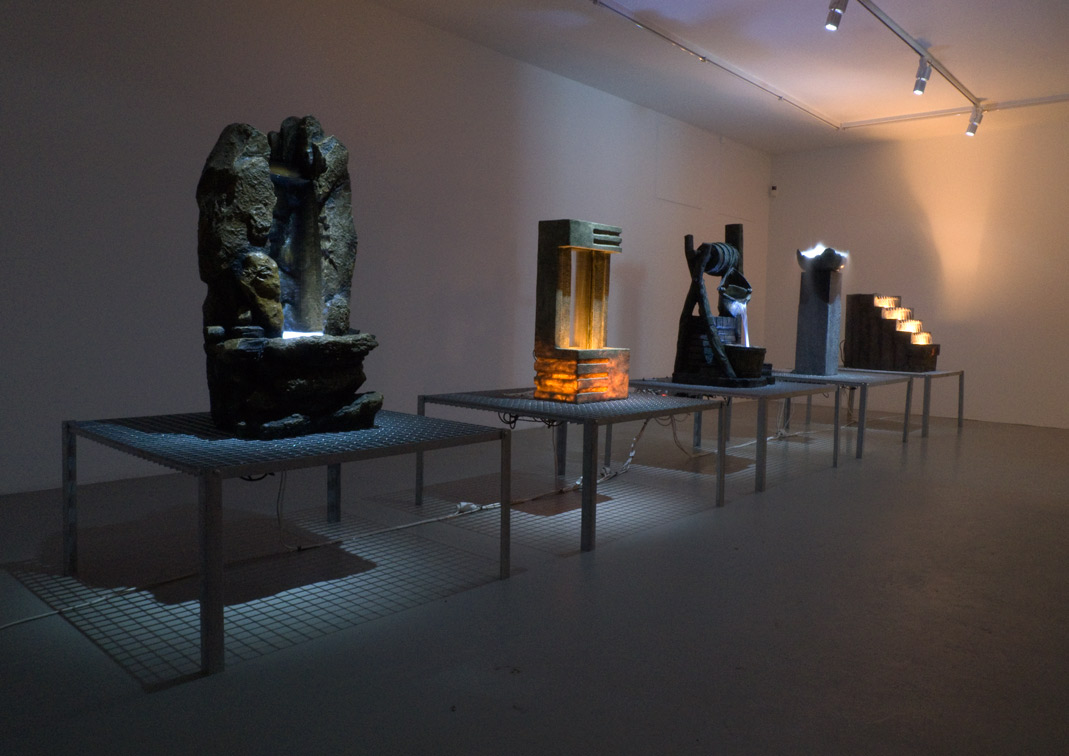
At first glance the World Community Grid Water Features are purely aesthetic objects – purposeless water fountains, decorative at best. What is concealed is that each of these objects contains a computer that is running a distributed computing platform, running processes that contribute to research towards cancer and AIDS cures, renewable energy projects, etc. AIDS-3D’s project targets the stereotypically self-serving and aesthetic nature of both computing and art, fulfilling Joseph Beuys’ famous question, “Can a sculpture change the world?”

Sam Lavery – 13-9-65

by sam @ 12:30 am
//reproduction of 13-9-65
 
//creates a boolean variable to keep track of when the mouse has been clicked. program creates new iteration with every click
boolean click = true;
 
//creates random number (between 4 and 6) of circles. just a guess based on the original artwork
float numCircle = random(4,6);
 
//variables used for creating arrays
int numLines = 9;
int numVertex = 8;
 
int testWidth = 500;
int testHeight = 500;
 
//x value arrays
float[]x1 = new float[numVertex];
float[]x2 = new float[numVertex];
float[]x3 = new float[numVertex];
float[]x4 = new float[numVertex];
float[]x5 = new float[numVertex];
float[]x6 = new float[numVertex];
float[]x7 = new float[numVertex];
float[]x8 = new float[numVertex];
float[]x9 = new float[numVertex];
 
//y value arrays
float[]y1 = new float[numVertex];
float[]y2 = new float[numVertex];
float[]y3 = new float[numVertex];
float[]y4 = new float[numVertex];
float[]y5 = new float[numVertex];
float[]y6 = new float[numVertex];
float[]y7 = new float[numVertex];
float[]y8 = new float[numVertex];
float[]y9 = new float[numVertex];
 
float[]slope1 = new float[numVertex-1];
float[]slope2 = new float[numVertex-1];
float[]slope3 = new float[numVertex-1];
float[]slope4 = new float[numVertex-1];
float[]slope5 = new float[numVertex-1];
float[]slope6 = new float[numVertex-1];
float[]slope7 = new float[numVertex-1];
float[]slope8 = new float[numVertex-1];
float[]slope9 = new float[numVertex-1];
 
float[]xintercept1 = new float[numVertex];
 
//setup  
 
void setup()
{
  size(testWidth, testHeight);
  background(255);
  smooth();
  noFill();
  stroke(0);
 
}
 
//function to change the state of "click" variable
 
 void mouseClicked()
 {
   click = true;
 }
 
//begin drawing
 
void draw()
{
  if(click)
  {
    background(255);
 
// create border
line(0,0,testWidth-1,0);
line(0,0,0,testHeight-1);
line(testWidth-1,testHeight-1,0,testHeight-1);
line(testWidth-1,testHeight-1,testWidth-1,0);
 
//create x value of vertices
 
      for(int i = 0; i < numVertex; i++)
  {
    x1[i] = (testWidth/numVertex)*i + random(testWidth/numLines, (testWidth/numVertex)*0.25*i);
    x2[i] = (testWidth/numVertex)*i + random(testWidth/numLines, (testWidth/numVertex)*0.25*i);
    x3[i] = (testWidth/numVertex)*i + random(testWidth/numLines, (testWidth/numVertex)*0.25*i);
    x4[i] = (testWidth/numVertex)*i + random(testWidth/numLines, (testWidth/numVertex)*0.25*i);
    x5[i] = (testWidth/numVertex)*i + random(testWidth/numLines, (testWidth/numVertex)*0.25*i);
    x6[i] = (testWidth/numVertex)*i + random(testWidth/numLines, (testWidth/numVertex)*0.25*i);
    x7[i] = (testWidth/numVertex)*i + random(testWidth/numLines, (testWidth/numVertex)*0.25*i);
    x8[i] = (testWidth/numVertex)*i + random(testWidth/numLines, (testWidth/numVertex)*0.25*i);
    x9[i] = (testWidth/numVertex)*i + random(testWidth/numLines, (testWidth/numVertex)*0.25*i);
  }
 
//set first x coordinate to 0 for all lines
 
  x1[0] = 0;
  x2[0] = 0;
  x3[0] = 0;
  x4[0] = 0;
  x5[0] = 0;
  x6[0] = 0;
  x7[0] = 0;
  x8[0] = 0;
  x9[0] = 0;
 
//set last x coordinate to the testWidth
 
  x1[numVertex-1] = testWidth;
  x2[numVertex-1] = testWidth;
  x3[numVertex-1] = testWidth;
  x4[numVertex-1] = testWidth;
  x5[numVertex-1] = testWidth;
  x6[numVertex-1] = testWidth;
  x7[numVertex-1] = testWidth;
  x8[numVertex-1] = testWidth;
  x9[numVertex-1] = testWidth;
 
//create y value of vertices
 
    for(int i = 0; i < numVertex; i++)
  {
    y1[i] = random(0, (testHeight/numLines));
    y2[i] = random(testHeight/numLines, (testHeight/numLines)*2);
    y3[i] = random((testHeight/numLines)*2, (testHeight/numLines)*3);
    y4[i] = random((testHeight/numLines)*3, (testHeight/numLines)*4);
    y5[i] = random((testHeight/numLines)*4, (testHeight/numLines)*5);
    y6[i] = random((testHeight/numLines)*5, (testHeight/numLines)*6);
    y7[i] = random((testHeight/numLines)*6, (testHeight/numLines)*7);
    y8[i] = random((testHeight/numLines)*7, (testHeight/numLines)*8);
    y9[i] = random((testHeight/numLines)*8, (testHeight/numLines)*9);
  }
 
//find slopes
 
  for(int i = 0; i< numVertex-1; i++)
  {
    slope1[i] = (y1[i]- y1[i+1])/(x1[i]-x1[i+1]);
    slope2[i] = (y2[i]- y2[i+1])/(x2[i]-x2[i+1]);
    slope3[i] = (y3[i]- y3[i+1])/(x3[i]-x3[i+1]);
    slope4[i] = (y4[i]- y4[i+1])/(x4[i]-x4[i+1]);
    slope5[i] = (y5[i]- y5[i+1])/(x5[i]-x5[i+1]);
    slope6[i] = (y6[i]- y6[i+1])/(x6[i]-x6[i+1]);
    slope7[i] = (y7[i]- y7[i+1])/(x7[i]-x7[i+1]);
    slope8[i] = (y8[i]- y8[i+1])/(x8[i]-x8[i+1]);
    slope9[i] = (y9[i]- y9[i+1])/(x9[i]-x9[i+1]);
 
  }
 
// draw horizontal lines from coordinates in arrays
 
    for(int i = 0; i< numVertex-1; i++)
    {
 
      line(x1[i],y1[i], x1[i+1],y1[i+1]);
      line(x2[i],y2[i], x2[i+1],y2[i+1]);
      line(x3[i],y3[i], x3[i+1],y3[i+1]);
      line(x4[i],y4[i], x4[i+1],y4[i+1]);
      line(x5[i],y5[i], x5[i+1],y5[i+1]);
      line(x6[i],y6[i], x6[i+1],y6[i+1]);
      line(x7[i],y7[i], x7[i+1],y7[i+1]);
      line(x8[i],y8[i], x8[i+1],y8[i+1]);
      line(x9[i],y9[i], x9[i+1],y9[i+1]);
    }
 
//draw vertical straight lines
 
  for(int i = 0; i< numVertex-1; i++)
  {
  int chance = int(random(1,8));
  int a = int(random(1,40));
  int b = int(random(1,40));
  int c = int(random(1,40));
  int d = int(random(1,40));
 
  if(chance == 1)
  {
  triangle(x1[i], y1[i], x1[i+1], y1[i+1], x2[i], y2[i]);
  triangle(x1[i], y1[i], x2[i+1], y2[i+1], x2[i], y2[i]);
  triangle(x1[i]+a, y1[i]+a*slope1[i], x1[i]+b, y2[i]+b*slope2[i], x2[i], y2[i]);
  triangle(x1[i]+c, y1[i]+c*slope1[i], x1[i]+d, y2[i]+d*slope2[i], x2[i+1], y2[i+1]);
  triangle(x1[i+1], y1[i+1], x1[i]+c, y1[i]+c*slope1[i], x2[i+1], y2[i+1]);
  }
  else if(chance ==3)
  {
 
  line(x1[i] + a, y1[i]+a*slope1[i], x1[i] + a, (y2[i])+a*slope2[i]);
  line(x1[i] + b, y1[i]+b*slope1[i], x1[i] + b, (y2[i])+b*slope2[i]);
  line(x1[i] + c, y1[i]+c*slope1[i], x1[i] + c, (y2[i])+c*slope2[i]);
  line(x1[i] + d, y1[i]+d*slope1[i], x1[i] + d, (y2[i])+d*slope2[i]);
  }
  }
 
  //fill 2
 
    for(int i = 0; i< numVertex-1; i++)
  {
  int chance = int(random(1,8));
  int a = int(random(1,40));
  int b = int(random(1,40));
  int c = int(random(1,40));
  int d = int(random(1,40));
 
  if(chance == 1)
  {
  triangle(x2[i], y2[i], x2[i+1], y2[i+1], x3[i], y3[i]);
  triangle(x2[i], y2[i], x3[i+1], y3[i+1], x3[i], y3[i]);
  triangle(x2[i]+a, y2[i]+a*slope2[i], x2[i]+b, y3[i]+b*slope3[i], x3[i], y3[i]);
  triangle(x2[i]+c, y2[i]+c*slope2[i], x2[i]+d, y3[i]+d*slope3[i], x3[i+1], y3[i+1]);
  triangle(x2[i+1], y2[i+1], x2[i]+c, y2[i]+c*slope2[i], x3[i+1], y3[i+1]);
  }
  else if(chance ==3)
  {
  line(x2[i] + a, y2[i]+a*slope2[i], x2[i] + a, (y3[i])+a*slope3[i]);
  line(x2[i] + b, y2[i]+b*slope2[i], x2[i] + b, (y3[i])+b*slope3[i]);
  line(x2[i] + c, y2[i]+c*slope2[i], x2[i] + c, (y3[i])+c*slope3[i]);
  line(x2[i] + d, y2[i]+d*slope2[i], x2[i] + d, (y3[i])+d*slope3[i]);
  }
  }
 
  //fill 3
 
      for(int i = 0; i< numVertex-1; i++)
  {
  int chance = int(random(1,6));
  int a = int(random(1,40));
  int b = int(random(1,40));
  int c = int(random(1,40));
  int d = int(random(1,40));
 
  if(chance == 1)
  {
  triangle(x3[i], y3[i], x3[i+1], y3[i+1], x4[i], y4[i]);
  triangle(x3[i], y3[i], x4[i+1], y4[i+1], x4[i], y4[i]);
  triangle(x3[i]+a, y3[i]+a*slope3[i], x3[i]+b, y4[i]+b*slope4[i], x4[i], y4[i]);
  triangle(x3[i]+c, y3[i]+c*slope3[i], x3[i]+d, y4[i]+d*slope4[i], x4[i+1], y4[i+1]);
  triangle(x3[i+1], y3[i+1], x3[i]+c, y3[i]+c*slope3[i], x4[i+1], y4[i+1]);
  }
  else if(chance ==3)
  {
  line(x3[i] + a, y3[i]+a*slope3[i], x3[i] + a, (y4[i])+a*slope4[i]);
  line(x3[i] + b, y3[i]+b*slope3[i], x3[i] + b, (y4[i])+b*slope4[i]);
  line(x3[i] + c, y3[i]+c*slope3[i], x3[i] + c, (y4[i])+c*slope4[i]);
  line(x3[i] + d, y3[i]+d*slope3[i], x3[i] + d, (y4[i])+d*slope4[i]);
  }
  }
 
  //fill 4
 
  for(int i = 0; i< numVertex-1; i++)
  {
  int chance = int(random(1,6));
  int a = int(random(1,40));
  int b = int(random(1,40));
  int c = int(random(1,40));
  int d = int(random(1,40));
 
  if(chance == 1)
  {
  triangle(x4[i], y4[i], x4[i+1], y4[i+1], x5[i], y5[i]);
  triangle(x4[i], y4[i], x5[i+1], y5[i+1], x5[i], y5[i]);
  triangle(x4[i]+a, y4[i]+a*slope4[i], x4[i]+b, y5[i]+b*slope5[i], x5[i], y5[i]);
  triangle(x4[i]+c, y4[i]+c*slope4[i], x4[i]+d, y5[i]+d*slope5[i], x5[i+1], y5[i+1]);
  triangle(x4[i+1], y4[i+1], x4[i]+c, y4[i]+c*slope4[i], x5[i+1], y5[i+1]);
  }
  else if(chance ==3)
  {
  line(x4[i] + a, y4[i]+a*slope4[i], x4[i] + a, (y5[i])+a*slope5[i]);
  line(x4[i] + b, y4[i]+b*slope4[i], x4[i] + b, (y5[i])+b*slope5[i]);
  line(x4[i] + c, y4[i]+c*slope4[i], x4[i] + c, (y5[i])+c*slope5[i]);
  line(x4[i] + d, y4[i]+d*slope4[i], x4[i] + d, (y5[i])+d*slope5[i]);
  }
  }
 
  //fill 5
 
  for(int i = 0; i< numVertex-1; i++)
  {
  int chance = int(random(1,6));
  int a = int(random(1,40));
  int b = int(random(1,40));
  int c = int(random(1,40));
  int d = int(random(1,40));
 
  if(chance == 1)
  {
  triangle(x5[i], y5[i], x5[i+1], y5[i+1], x6[i], y6[i]);
  triangle(x5[i], y5[i], x6[i+1], y6[i+1], x6[i], y6[i]);
  triangle(x5[i]+a, y5[i]+a*slope5[i], x5[i]+b, y6[i]+b*slope6[i], x6[i], y6[i]);
  triangle(x5[i]+c, y5[i]+c*slope5[i], x5[i]+d, y6[i]+d*slope6[i], x6[i+1], y6[i+1]);
  triangle(x5[i+1], y5[i+1], x5[i]+c, y5[i]+c*slope5[i], x6[i+1], y6[i+1]);
  }
  else if(chance ==3)
  {
  line(x5[i] + a, y5[i]+a*slope5[i], x5[i] + a, (y6[i])+a*slope6[i]);
  line(x5[i] + b, y5[i]+b*slope5[i], x5[i] + b, (y6[i])+b*slope6[i]);
  line(x5[i] + c, y5[i]+c*slope5[i], x5[i] + c, (y6[i])+c*slope6[i]);
  line(x5[i] + d, y5[i]+d*slope5[i], x5[i] + d, (y6[i])+d*slope6[i]);
  }
  } 
 
  //fill 6
 
  for(int i = 0; i< numVertex-1; i++)
  {
  int chance = int(random(1,6));
  int a = int(random(1,40));
  int b = int(random(1,40));
  int c = int(random(1,40));
  int d = int(random(1,40));
 
  if(chance == 1)
  {
  triangle(x6[i], y6[i], x6[i+1], y6[i+1], x7[i], y7[i]);
  triangle(x6[i], y6[i], x7[i+1], y7[i+1], x7[i], y7[i]);
  triangle(x6[i]+a, y6[i]+a*slope6[i], x6[i]+b, y7[i]+b*slope7[i], x7[i], y7[i]);
  triangle(x6[i]+c, y6[i]+c*slope6[i], x6[i]+d, y7[i]+d*slope7[i], x7[i+1], y7[i+1]);
  triangle(x6[i+1], y6[i+1], x6[i]+c, y6[i]+c*slope6[i], x7[i+1], y7[i+1]);
  }
  else if(chance ==3)
  {
  line(x6[i] + a, y6[i]+a*slope6[i], x6[i] + a, (y7[i])+a*slope7[i]);
  line(x6[i] + b, y6[i]+b*slope6[i], x6[i] + b, (y7[i])+b*slope7[i]);
  line(x6[i] + c, y6[i]+c*slope6[i], x6[i] + c, (y7[i])+c*slope7[i]);
  line(x6[i] + d, y6[i]+d*slope6[i], x6[i] + d, (y7[i])+d*slope7[i]);
  }
  }
  //fill 7
 
  for(int i = 0; i< numVertex-1; i++)
  {
  int chance = int(random(1,6));
  int a = int(random(1,40));
  int b = int(random(1,40));
  int c = int(random(1,40));
  int d = int(random(1,40));
 
  if(chance == 1)
  {
  triangle(x7[i], y7[i], x7[i+1], y7[i+1], x8[i], y8[i]);
  triangle(x7[i], y7[i], x8[i+1], y8[i+1], x8[i], y8[i]);
  triangle(x7[i]+a, y7[i]+a*slope7[i], x7[i]+b, y8[i]+b*slope8[i], x8[i], y8[i]);
  triangle(x7[i]+c, y7[i]+c*slope7[i], x7[i]+d, y8[i]+d*slope8[i], x8[i+1], y8[i+1]);
  triangle(x7[i+1], y7[i+1], x7[i]+c, y7[i]+c*slope7[i], x8[i+1], y8[i+1]);
  }
  else if(chance ==3)
  {
  line(x7[i] + a, y7[i]+a*slope7[i], x7[i] + a, (y8[i])+a*slope8[i]);
  line(x7[i] + b, y7[i]+b*slope7[i], x7[i] + b, (y8[i])+b*slope8[i]);
  line(x7[i] + c, y7[i]+c*slope7[i], x7[i] + c, (y8[i])+c*slope8[i]);
  line(x7[i] + d, y7[i]+d*slope7[i], x7[i] + d, (y8[i])+d*slope8[i]);
  }
  } 
 
  //fill 8
 
  for(int i = 0; i< numVertex-1; i++)
  {
  int chance = int(random(1,6));
  int a = int(random(1,40));
  int b = int(random(1,40));
  int c = int(random(1,40));
  int d = int(random(1,40));
 
  if(chance == 1)
  {
  triangle(x8[i], y8[i], x8[i+1], y8[i+1], x9[i], y9[i]);
  triangle(x8[i], y8[i], x9[i+1], y9[i+1], x9[i], y9[i]);
  triangle(x8[i]+a, y8[i]+a*slope8[i], x8[i]+b, y9[i]+b*slope9[i], x9[i], y9[i]);
  triangle(x8[i]+c, y8[i]+c*slope8[i], x8[i]+d, y9[i]+d*slope9[i], x9[i+1], y9[i+1]);
  triangle(x8[i+1], y8[i+1], x8[i]+c, y8[i]+c*slope8[i], x9[i+1], y9[i+1]);
  }
  else if(chance ==3)
  {
  line(x8[i] + a, y8[i]+a*slope8[i], x8[i] + a, (y9[i])+a*slope9[i]);
  line(x8[i] + b, y8[i]+b*slope8[i], x8[i] + b, (y9[i])+b*slope9[i]);
  line(x8[i] + c, y8[i]+c*slope8[i], x8[i] + c, (y9[i])+c*slope9[i]);
  line(x8[i] + d, y8[i]+d*slope8[i], x8[i] + d, (y9[i])+d*slope9[i]);
 
  }
  }   
 
//circles
 
 for (int i=0; i<numCircle; i++)
  {
 
    float circumfrence = random(10,130);
    ellipse(random(circumfrence, testHeight-circumfrence), random(circumfrence, testHeight-circumfrence), circumfrence, circumfrence);
 
  }
  click = false;
  }
}

SankalpBhatnagar-FaceOSC

by sankalp @ 11:54 pm 23 January 2012

I’m one of those guys who, upon hearing an awesome song played through my speakers, moves his face closer to the screen. I usually find myself doing it when I listen to songs on YouTube. While funny, this habit is not safe, and arguably unhealthy for my eyes. Thus with the help of Face OSC by Kyle McDonald and Dan Wilcox, I made a program that speeds up the rate of the video and thus the rate of the song if I get closer and slows down if I get too far away. Ultimately, this program was created to keep my eyes at a safe distance from my screen, but turned out to be a pretty fun program that explores the possibilities of face tracking technology.


[youtube https://www.youtube.com/watch?v=_hTIKV5uENU]

Deren Guler – FaceOSC

by deren @ 11:54 pm

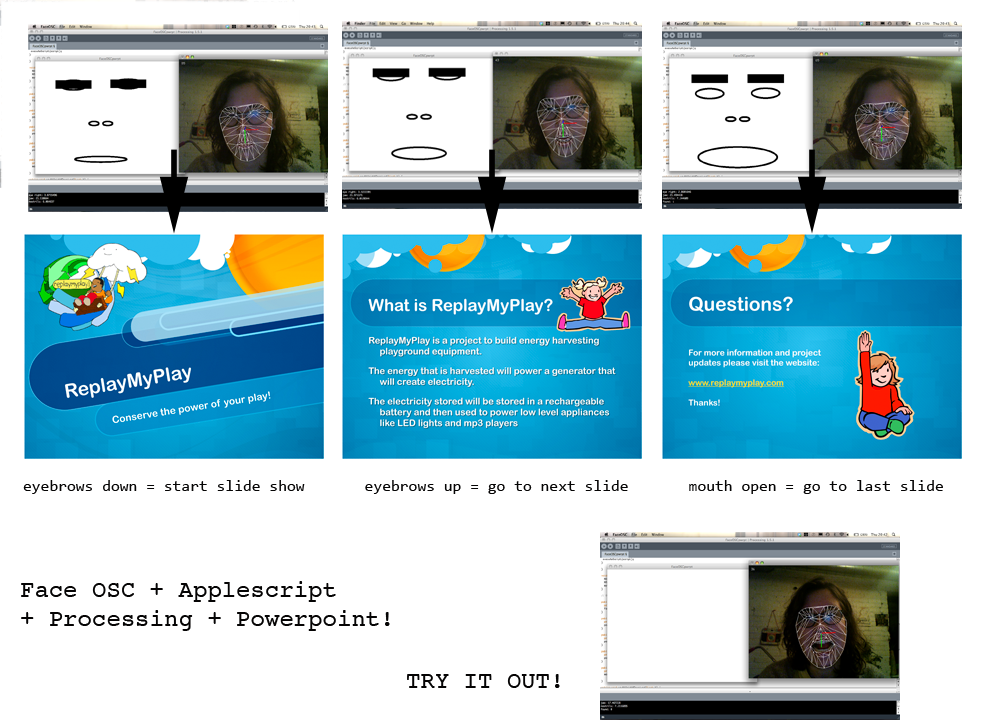
I used applescript in Processing to control different application on my computer through face movements using the Cocoa library in Processing. I tried a few different applications but focused on Powerpoint because a friend of mine asked if I could hack Powerpoint to run through external gestures. I found an applescript handbook for Powerpoint 2004 which was compatible with my version of the program. The complete list of powerpoint commands can be found here
You can look up commands for most programs pretty easily and substitute different actions. I found that the mouth and eyebrow gestures were easiest to work with in terms of limiting the response rate to more dramatic gestures.


video coming…

Here is the code for Powerpoint 2004:

//
// a template for receiving face tracking osc messages from
// Kyle McDonald's FaceOSC https://github.com/kylemcdonald/ofxFaceTracker
//
// 2012 Dan Wilcox danomatika.com
// for the IACD Spring 2012 class at the CMU School of Art
//
// adapted from from Greg Borenstein's 2011 example
// http://www.gregborenstein.com/
// https://gist.github.com/1603230
//
import com.apple.cocoa.foundation.*; // to access applescript
import oscP5.*;
OscP5 oscP5;
 
// num faces found
int found;
 
// pose
float poseScale;
PVector posePosition = new PVector();
PVector poseOrientation = new PVector();
 
// gesture
float mouthHeight;
float mouthWidth;
float eyeLeft;
float eyeRight;
float eyebrowLeft;
float eyebrowRight;
float jaw;
float nostrils;
 
void setup() {
size(640, 480);
frameRate(30);
 
oscP5 = new OscP5(this, 8338);
oscP5.plug(this, "found", "/found");
oscP5.plug(this, "poseScale", "/pose/scale");
oscP5.plug(this, "posePosition", "/pose/position");
oscP5.plug(this, "poseOrientation", "/pose/orientation");
oscP5.plug(this, "mouthWidthReceived", "/gesture/mouth/width");
oscP5.plug(this, "mouthHeightReceived", "/gesture/mouth/height");
oscP5.plug(this, "eyeLeftReceived", "/gesture/eye/left");
oscP5.plug(this, "eyeRightReceived", "/gesture/eye/right");
oscP5.plug(this, "eyebrowLeftReceived", "/gesture/eyebrow/left");
oscP5.plug(this, "eyebrowRightReceived", "/gesture/eyebrow/right");
oscP5.plug(this, "jawReceived", "/gesture/jaw");
oscP5.plug(this, "nostrilsReceived", "/gesture/nostrils");
}
 
void draw() {
background(255);
stroke(0);
 
if(found > 0) {
translate(posePosition.x, posePosition.y);
scale(poseScale);
noFill();
ellipse(-20, eyeLeft * -9, 20, 7);
ellipse(20, eyeRight * -9, 20, 7);
ellipse(0, 20, mouthWidth* 3, mouthHeight * 3);
ellipse(-5, nostrils * -1, 7, 3);
ellipse(5, nostrils * -1, 7, 3);
rectMode(CENTER);
fill(0);
rect(-20, eyebrowLeft * -5, 25, 5);
rect(20, eyebrowRight * -5, 25, 5);
}
 
//some powerpoint commands
if (mouthWidth > 15){
String script = "tell application \"Microsoft PowerPoint\"" +"\n" + "go to next slide slideshow view of slide show window 1" + "\n" + "end tell";
executeScript(script);
}
 
if (mouthWidth < 15){
String script = "tell application \"Microsoft PowerPoint\"" +"\n" + "go to previous slide slideshow view of slide show window 1" + "\n" + "end tell";
executeScript(script);
 
}
 
if (eyebrowLeft > 8){
String script = "tell application \"Microsoft PowerPoint\"" +"\n" + "exit slide show slideshow view of slide show window 1 " + "\n" + "end tell";
executeScript(script);
}
 
if (eyebrowLeft < 6){
String script = "set theView to slide show view of theWindow " + "\n" + "end tell";
executeScript(script);
}
 
}
 
void executeScript(String script) {
NSAppleScript myScript = new NSAppleScript(script);
NSMutableDictionary errors = new NSMutableDictionary();
myScript.execute(errors);
}
 
// OSC CALLBACK FUNCTIONS
 
public void found(int i) {
println("found: " + i);
found = i;
}
 
public void poseScale(float s) {
println("scale: " + s);
poseScale = s;
}
 
public void posePosition(float x, float y) {
println("pose position\tX: " + x + " Y: " + y );
posePosition.set(x, y, 0);
}
 
public void poseOrientation(float x, float y, float z) {
println("pose orientation\tX: " + x + " Y: " + y + " Z: " + z);
poseOrientation.set(x, y, z);
}
 
public void mouthWidthReceived(float w) {
println("mouth Width: " + w);
mouthWidth = w;
 
}
 
public void mouthHeightReceived(float h) {
println("mouth height: " + h);
mouthHeight = h;
}
 
public void eyeLeftReceived(float f) {
println("eye left: " + f);
eyeLeft = f;
}
 
public void eyeRightReceived(float f) {
println("eye right: " + f);
eyeRight = f;
}
 
public void eyebrowLeftReceived(float f) {
println("eyebrow left: " + f);
eyebrowLeft = f;
}
 
public void eyebrowRightReceived(float f) {
 
println("eyebrow right: " + f);
eyebrowRight = f;
}
 
public void jawReceived(float f) {
println("jaw: " + f);
jaw = f;
}
 
public void nostrilsReceived(float f) {
println("nostrils: " + f);
nostrils = f;
}
 
// all other OSC messages end up here
void oscEvent(OscMessage m) {
if(m.isPlugged() == false) {
println("UNPLUGGED: " + m);
}
}

Deren- Looking Outwards1

by deren @ 11:42 pm

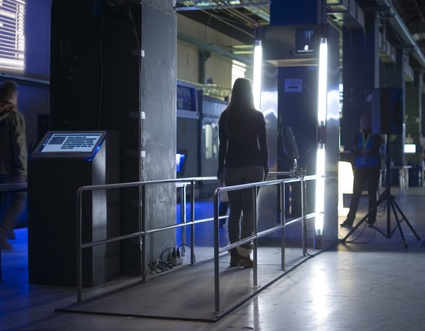
The Physiognomic Scrutinizer is an installation the scans a person as s/he walks through a doorway and matches his/her face to that a face of a person who is famous for controversial reason. The author of the blog post said that the project was very influential and he went back several times. It doesn’t sound seem like having your face matched to someone else’s would have that dramatic of an effect, but perhaps it would make you think about the lives of these people and have some sort of sympathy for them. I think this piece might be better if it stressed the random sympathy that can be induced in one’s brain.


Joshua Kirsch – Concentricity, Interactive Light Sculpture 2011

In this installation the user interacts with  a handle in the middle of the piece to turn the inner structure around. The turns create changes in the lights around the inner structure. I don’t really understand what this is supposed to represent from the artist’s description, I think he is trying to link to light to the strength of the magnetic field. This is not a clear relationship to me, I think it would be more interesting if you made something move in an unexpected way as you turn the handle

concentricity

The Bloom Music Visualization


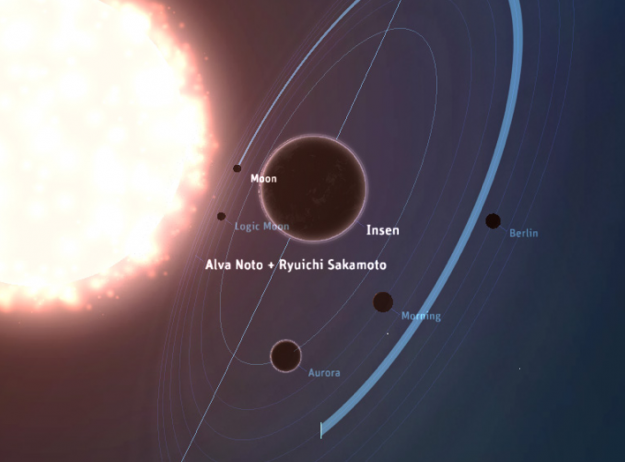
This project maps your music library to a virtual “solar system” that you can travel through to shuffle between artists. I like the idea of creating a new dimension/reality to your music library, but I’m not sure if I understand why it is a solar system. I think a globe that actually maps where the artists are coming from or where the music was made. The solar system suggests that the music was created throughout different stars, I guess drawing from the idea that artists are all “stars”.

MadelineGannon-3D Wolf Puppet with FaceOSC

by madeline @ 11:37 pm

3D Wolf Puppet

A framework for bringing 3D mesh data from Rhino (via Grasshopper) into Processing_0195.
The mesh from Rhino is exported as .txt files that contain the model’s UNIQUE VERTICES, as well as the ORDERED VERTICES needed to construct each face. .txt are then streamed from the Rhino/GH file into the sketch’s data folder.

This demo uses FaceOSC to control a 3D puppet, using eyebrow and mouth data to modify the ears and jaw. The code synchronizes the movements of your head, mouth, and eyebrows to control the expressions of a tessellated three-dimensional model. The model was first developed in Rhino3D, then translated to the Processing programming environment through Grasshopper, then connected to Kyle McDonald’s FaceOSC app through Oscp5. PeasyCam is also used for navigation.

Pivot points, as well as points to be rotated are specified in Grasshopper, then exported as .txt files to Processing. While the current puppet is highly tessellated, one can begin to create additional faces (and unique vertices) to give the model higher detail.

+ + + + + + + + + + + + + + + + + + +
Inspired by the work of Karolina Sobecka.
+ + + + + + + + + + + + + + + + + + +

Click to download the java project | gh2faceOSC (rhino + grasshopper files are in the data folder)

[vimeo https://vimeo.com/35550605]
**sorry about the weird faces**
____________________________________________________________________________________

Below is a screengrab of my Rhino / Grasshopper setup:

______________________________________________________________________________________

Kaushal Agrawal – FaceOSC

by kaushal @ 10:36 pm

[youtube=https://www.youtube.com/watch?v=30Szotjp8PA&feature=youtu.be]

I used the FaceOSC and OpenFrameworks wrapper to create a dummy Pacman game. The game is driven by mouth height and face orientation parameters returned by faceOSC. As soon as the user opens the mouth, the Pacman is set to move and when the user closes the mouth, Pacman moves forward. The user can only steer the Pacman left or right to the direction of movement by tilting the head in either directions. The tilt of the head is decided by threshold values to ensure correct turning of the character in the game. The original maze from Pacman was reduced to a simple one to reduce complexity and the ghosts were taken out. To make the game interesting, I added a level completion time. A few things that I realized after completing the project was that while its fascinating to see the game controlled by mouth, it can really exhaust you over multiple play session.
Interesting possibilities: Could use pre-recorded videos from interviews, and use that to drive the game and assign them Pacman scores!

Blase-LookingOutwards-1

by blase @ 10:34 pm

Rafael Lozano-Hemmer- Voice Array

Rafael Lozano-Hemmer’s Voice Array leads participants to speak into a small microphone that records a snippet of their voice. What they say is then visualized by the first pair of LEDs on a linear array of 576 white LEDs. This recording is then joined by the previous 287 recordings in a giant cacophony of both light and sound. (One participant’s homage to pop music at 2:13 works particularly well, in my opinion.) What’s particularly striking about this piece is how each person is reduced to a voice whose only physical embodiment is the pulsation of a pair of white LED lights. I also think it’s also very interesting to see how adults react with amazement from hearing their own voice recorded and visualized in a manner that one might expect from a child. However, it took me a while to realize where the random voice at the end of the visualization was coming from; this was the 288th oldest voice, which was now being pushed off the stack. I’m not sure I agree with that choice.


From the Future Feeder blog, I then discovered the Looking into the Past pool on Flickr. This is an awesome pool of modern photographs with decades old photographs of the same location spliced in. Below, I’ve included the image on Future Feeder that caught my attention. However, a handful of photographs in which old pictures of children were spliced into their old rooms and haunts also caught my eye. I think this style of mashup captures some of the temporal nature of photography, which was on my mind after I went last year to a couple places that I had originally ventured to in 2008, never expecting to return. I now have a series of photographs from both times, and I wonder whether mashing up these photos would be interesting. Overall, I like that this Flickr pool has created a community of individuals using technology in the same way to make art that involves the same process, but with diverse effects.


Nils Volker’s Variations on Pi is a series of light paintings loosely based on the digits of pi. The most interesting part of this series of light paintings, however, is that they were created by a robot he built. When filmed from above, this robot, whose wheels seem to be designed specifically to turn in circles, is able to make wonderfully symmetric light paintings. I particularly like the idea of using a robot to algorithmically create light paintings. In some sense, I always imagine people making light paintings with flashlights, flailing around wildly. The preciseness of a robotic light painting adds something new, sterile, yet fascinating to the form. However, I wonder why he didn’t provide an interface for himself or others to make arbitrary light paintings with this robot. While the digits of pi are interesting, a multipurpose robot for light painting, with a thoughtful interface, would be awesome.

« Previous PageNext Page »
This work is licensed under a Creative Commons Attribution-Noncommercial-Share Alike 3.0 Unported License.
(c) 2023 Interactive Art and Computational Design, Spring 2012 | powered by WordPress with Barecity